
74% of Americans say their LinkedIn photo is one of the most important parts of a profile, yet 50.26% of LinkedIn users say they've kept the same photo for 3 to 6 years or longer. That gap explains why so many profiles feel dated, vague, or slightly off. The photo matters more than most professionals admit, and it stays in place long enough to shape how people remember you.
A LinkedIn headshot isn't a decorative extra. It's a long-lived identity signal that shows up beside your comments, your applications, and your direct outreach. When nearly 45% of users also say they're dissatisfied with their current image, the problem isn't vanity. It's that a weak photo undermines trust while people keep using it for years passport-photo.online survey summary.
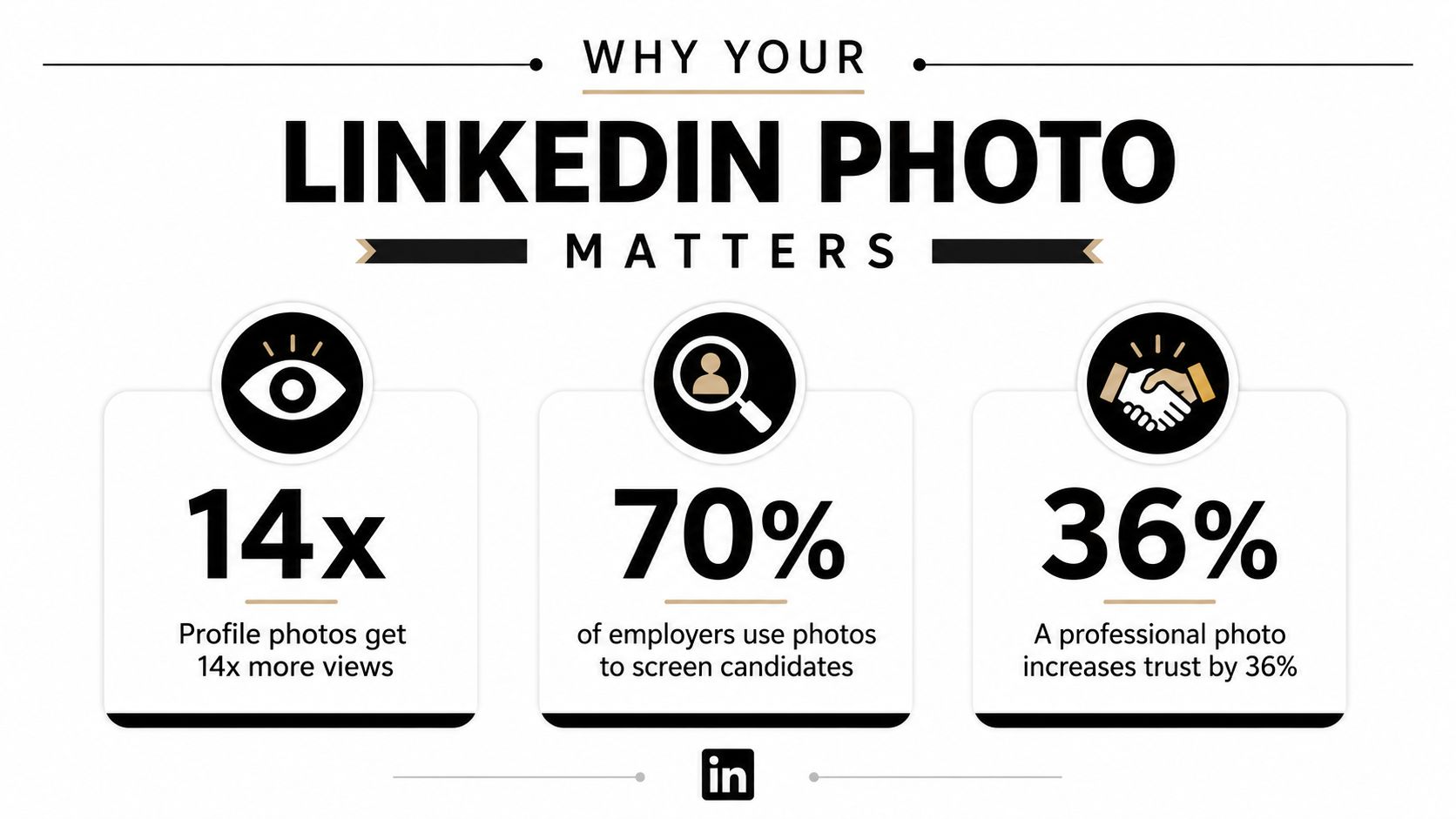
Why Your LinkedIn Photo Matters More Than You Think
A LinkedIn profile photo sits in a trust-first environment, so it does more work than a generic headshot. Every time someone sees your comment, message, application, or search result, they see your face before they read your title. That first glance decides whether you seem current, credible, and relevant to the role you want.
The mismatch is easy to spot. Analysts at survey summary report that 74% of Americans agree or strongly agree that a LinkedIn photo is one of the most important parts of a profile, yet many users keep the same image for years. A photo that once looked fine can start sending the wrong signal after a promotion, a career change, or even just a few years of visual drift.
For executives and client-facing professionals, that signal matters even more. A headshot should make your face easy to recognize, your expression easy to read, and your presence easy to trust. If the image looks dated or overly polished, people notice that tension before they've read your headline.
Practical rule: if your photo no longer looks like you on a normal workday, it is too old for LinkedIn.
LinkedIn's own guidance reflects the platform's visual design. The company recommends a recent, high-resolution, square image that is centered on the face, with the face filling about 60% of the frame LinkedIn profile photo guidance. That is recognition design, not decorative portrait advice. A photo can look acceptable on a desktop and still fail once it is reduced to a small circular thumbnail on mobile, where edge detail disappears and the crop does most of the talking.
A practical way to prepare is to use a simple checklist before the shoot. A photo shoot checklist helps you confirm the basics before you step in front of the camera, which reduces avoidable mistakes on set.
Treat the profile image as part of your personal brand system. If the current photo was chosen casually, it is probably doing less for you than you think.
Planning Your Shoot for Maximum Impact
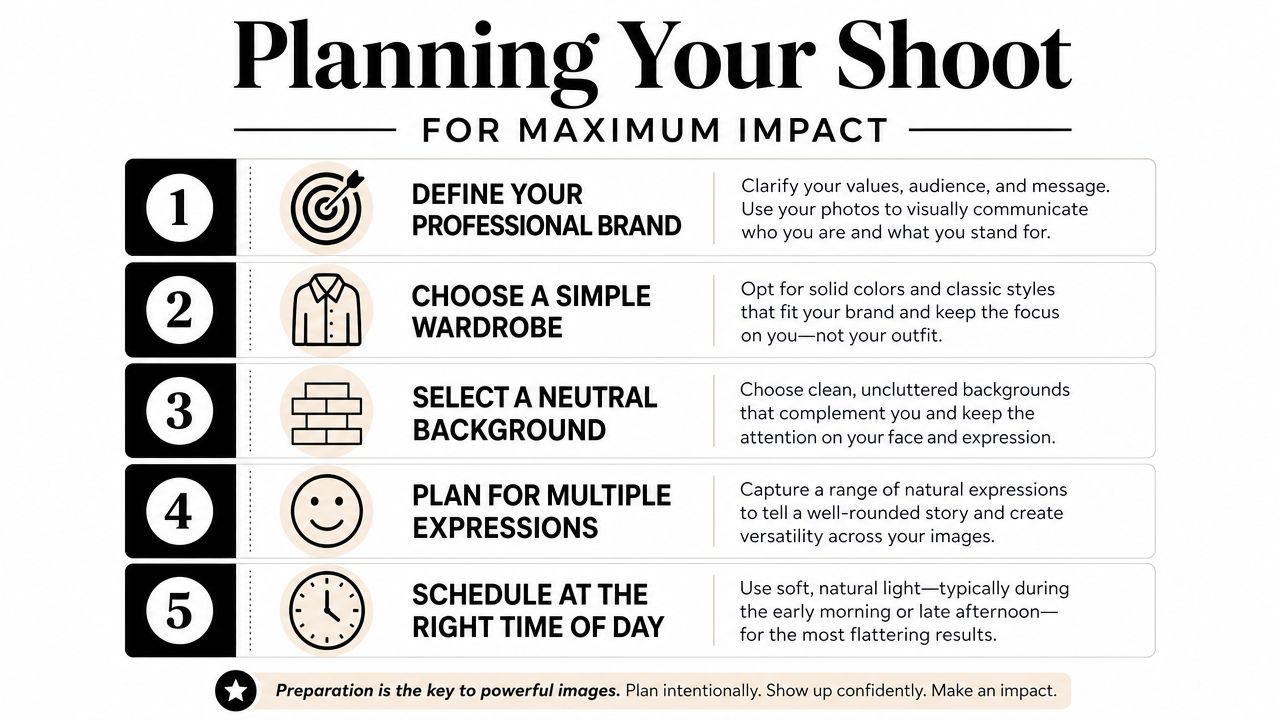
A good LinkedIn headshot starts before the camera comes out of the bag. Wardrobe, background, and grooming all affect how the final image reads on screen, especially once it gets reduced to a small avatar. A polished photo usually comes from a set of ordinary decisions made well, not from heavy editing afterward.
Wardrobe that reads clearly on camera
Solid, mid-tone colors usually photograph cleaner than busy patterns because the viewer's eye stays on your face. If a shirt has a tight print, thin stripes, or reflective fabric, the pattern can start competing with your expression. That's a bad trade on a profile photo, where you only have a small amount of visual real estate to work with.
Bring two or three options to the session. A jacket, a knit layer, and a simple shirt often give enough variation without making the wardrobe decision feel theatrical. Neckline matters too. Open collars and modest necklines tend to frame the face better than high, boxy cuts that crowd the chin and shorten the neck.
Backgrounds that support the role
A neutral studio backdrop is the safest choice when the job needs broad corporate trust. Environmental backgrounds can work when the setting adds context, such as an architect in a designed interior or a founder in a modern office. The test is simple, the background should support the message, not explain the photo.
Grooming deserves the same discipline. Hair should be styled the way you'd normally wear it in a real meeting, not in a way that only works under studio lights. Skin prep matters because high-resolution files show shine, texture, and uneven tone more clearly than phone screens do. A little planning before the shoot saves a lot of retouching later.
A useful planning checklist is available in this photo shoot checklist. Use it to decide what your photo should say before you start deciding where to stand.
If the outfit feels slightly more formal than your everyday clothes, that's usually about right for LinkedIn.
Lighting and Composition Techniques That Work

Lighting is the difference between a snapshot and a headshot people trust. Soft light gives the skin shape without carving hard shadows into the eye sockets or under the nose. That's why a window with open shade often beats harsh noon sun, and why a simple light source placed broad and slightly off-axis can look more expensive than elaborate gear used badly.
The issue isn't just brightness. It's direction. When the light comes from one side but stays soft, the face keeps dimension without looking dramatic or moody. That's usually the sweet spot for LinkedIn, because the image needs to feel approachable and competent at the same time.
A studio setup can do the same job with more control. A key light shapes the face, a fill light softens the shadows, and a background light keeps the separation clean. On a set, the difference usually comes from tiny adjustments, moving the light a few inches, asking the subject to turn their shoulders slightly, or lifting the camera to eye level so the jawline reads cleanly.
Composition that survives the crop
LinkedIn photos live in a small frame, so composition has to be strict. Eyes that sit too low make the portrait feel bottom-heavy. Too much headroom makes the subject look tiny. Too little room at the top makes the crop feel cramped.
The cleanest setup is usually a head-and-shoulders frame with the eyes near the upper third and the camera at roughly eye height. A slight shoulder turn often looks better than a straight-on square pose because it gives the body some shape while keeping the face connected to the viewer. Hands can work if they're intentional, but they should never look like they were added to fill space.
For photographers who like to see the principles in motion, this lighting guide for portraits is a useful reference point. It helps translate broad lighting ideas into decisions you can make on set.
A simple mistake I see often is overcorrecting. People lean too far back, lift the chin too high, or smile so tightly that the expression freezes. The strongest LinkedIn portraits feel calm, direct, and lightly engaged. That's harder to fake than many think.
Optimizing for LinkedIn's Circular Crop and Mobile View
A lot of good headshots fail. The portrait may look excellent in the camera preview, then collapse into something cramped or unreadable once LinkedIn turns it into a circle and shrinks it for mobile. The solution is to shoot for the crop, not around it.
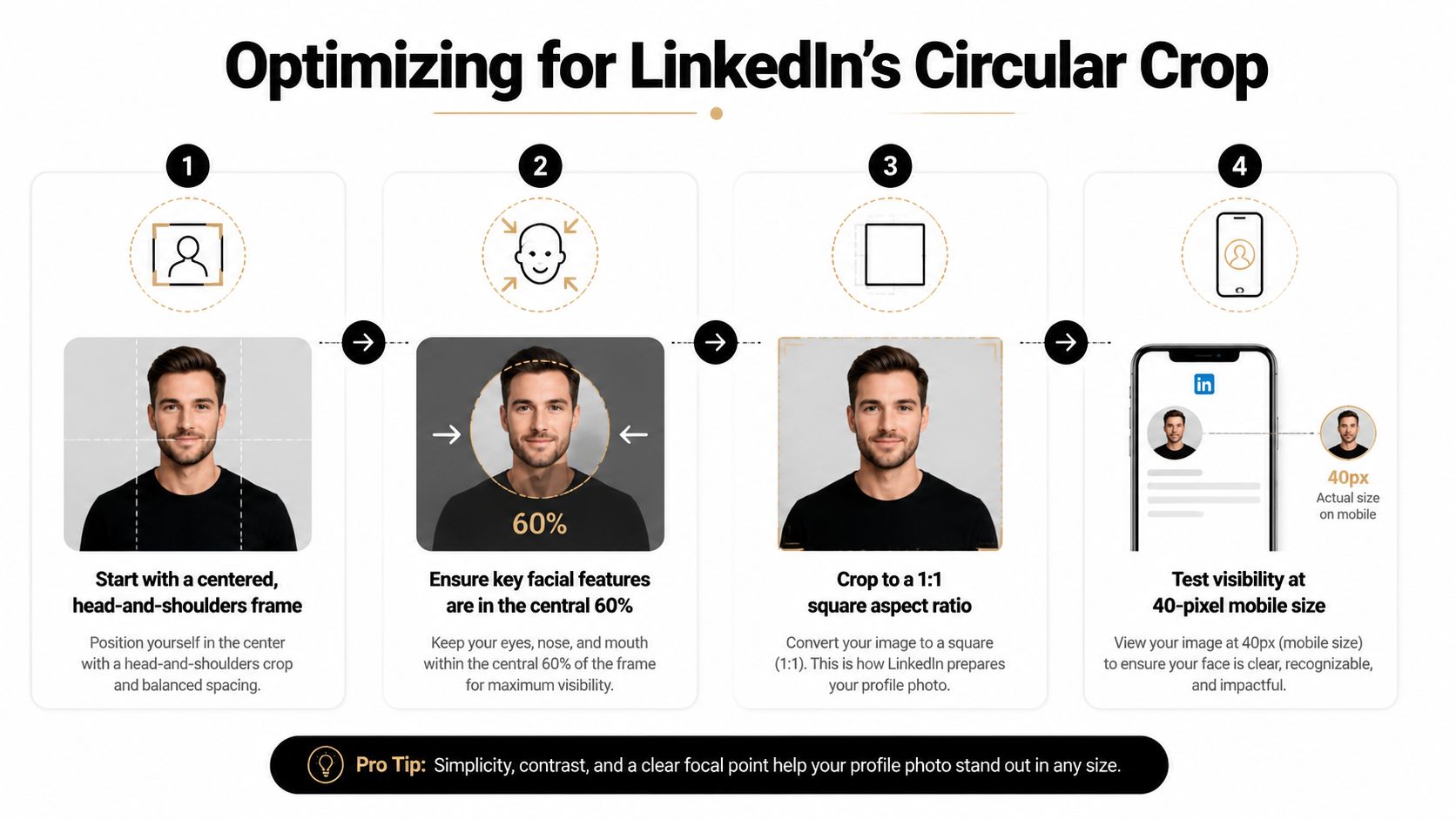
LinkedIn's guidance says the profile image should be square, recent, high resolution, and at least 400 x 400 pixels, with a maximum file size of 8 MB. It also recommends that the face fill about 60% of the frame LinkedIn profile photo guidance. That combination matters because the platform auto-crops and resizes aggressively across desktop and mobile.
The practical rule is to keep the important parts of the face inside the center of the square. Eyes should sit comfortably in the upper third, not at the edge of the crop. Hair volume, shoulders, and even jacket lapels need enough breathing room so the image still reads well when it turns into a tiny thumbnail.
A portrait that looks balanced at full size can still fail if the chin is too low or the shoulders are too wide for the circle.
Mobile testing is the step people skip. Open the file small, crop it to a square, then shrink it until it mimics a thumbnail. If the photo still reads clearly at that size, it's probably strong enough for LinkedIn. If you have to squint to find the eyes, the crop is too loose or the face is too low.
This is also where environmental portraits can get tricky. A background that feels tasteful at a large size may become visual noise once the image is reduced. Clean edges, simple color separation, and centered framing matter more than scenic detail. In this context, less background is usually more professionalism.
For a broader discussion of crop-aware framing, the technical angle in recent LinkedIn profile picture guidance is worth noting. The key idea is straightforward, a profile image has to work as a tiny icon first and a portrait second.
Retouching Without Losing Authenticity
Retouching should remove distractions, not manufacture a different person. On LinkedIn, that distinction matters because the photo sits in a trust environment. If the image looks over-smoothed, over-sculpted, or oddly AI-polished, the viewer often feels the mismatch before they can explain it.
The safest threshold is modest. Clean up temporary blemishes, tame flyaway hair, reduce obvious exposure problems, and even out distracting color cast. Leave natural skin texture alone. Keep laugh lines, freckles, and the small asymmetries that make a face recognizable in real life.
That approach is especially important for client-facing roles. Architects, consultants, executives, and anyone selling expertise through direct relationships benefit from a face that looks competent and real, not airbrushed into anonymity. A headshot should lower friction, not trigger suspicion that the photo and the person won't match.
A sensible editing brief is short and concrete.
- Fix temporary issues: remove a stray hair, a pimple, or a blemish that wasn't there the day before.
- Preserve identity markers: keep the structure of the face, the texture of the skin, and the expression intact.
- Correct technical problems: balance harsh shadows, slight color shifts, or lens issues that distract from the subject.
- Avoid gimmicks: skip filters, dramatic reshaping, and anything that makes the portrait feel stylized instead of professional.
If a team needs consistency across several leaders, the answer isn't to force everyone into identical lighting or identical expressions. It's to standardize background, crop, and editing style so the portraits feel like they belong to the same brand family. That keeps the company looking organized without flattening everyone into the same face.
For cases where editing is part of the workflow, this professional photo editing service is one route among several. The principle stays the same either way, polish the image, but don't erase the person.
What to Expect from a Professional Studio Session
A professional session usually starts with a quick conversation, not a pose. The photographer should ask how the image will be used, what tone fits the role, and whether the client wants something polished, approachable, or more editorial. That conversation shapes everything from wardrobe guidance to how much expression direction happens on set.
In the studio, the pace tends to be calmer than first-time clients expect. Good photographers don't just press the shutter. They watch posture, adjust the chin angle, refine the shoulders, and keep the subject relaxed enough to give a real expression instead of a rehearsed one. The best frames often come after the client stops trying to “do headshot” and starts talking normally.
Then comes the selection and delivery process. A headshot-focused photographer should provide files that are clean, cropped correctly, and ready for platform use. If a team is booking multiple people, consistency matters just as much as individual expression, because the final set has to feel coherent across the whole company page, not like a stack of unrelated portraits.
Jimmy Clemmons Photographer is one option for teams that need professional portraits alongside broader brand and corporate imagery. The studio's workflow includes on-set direction and editing, which can help keep the final headshots aligned across different people and sessions. The main question to ask any photographer is simple, will the result still look like you when LinkedIn shrinks it to a thumbnail.
If your current LinkedIn photo feels outdated, cramped, or too polished to trust, Jimmy Clemmons Photographer can help you replace it with a portrait that fits how the platform displays your face. Visit Jimmy Clemmons Photographer to book a professional portrait session that's built for real-world profile use, not just a nice-looking file on a camera roll.