
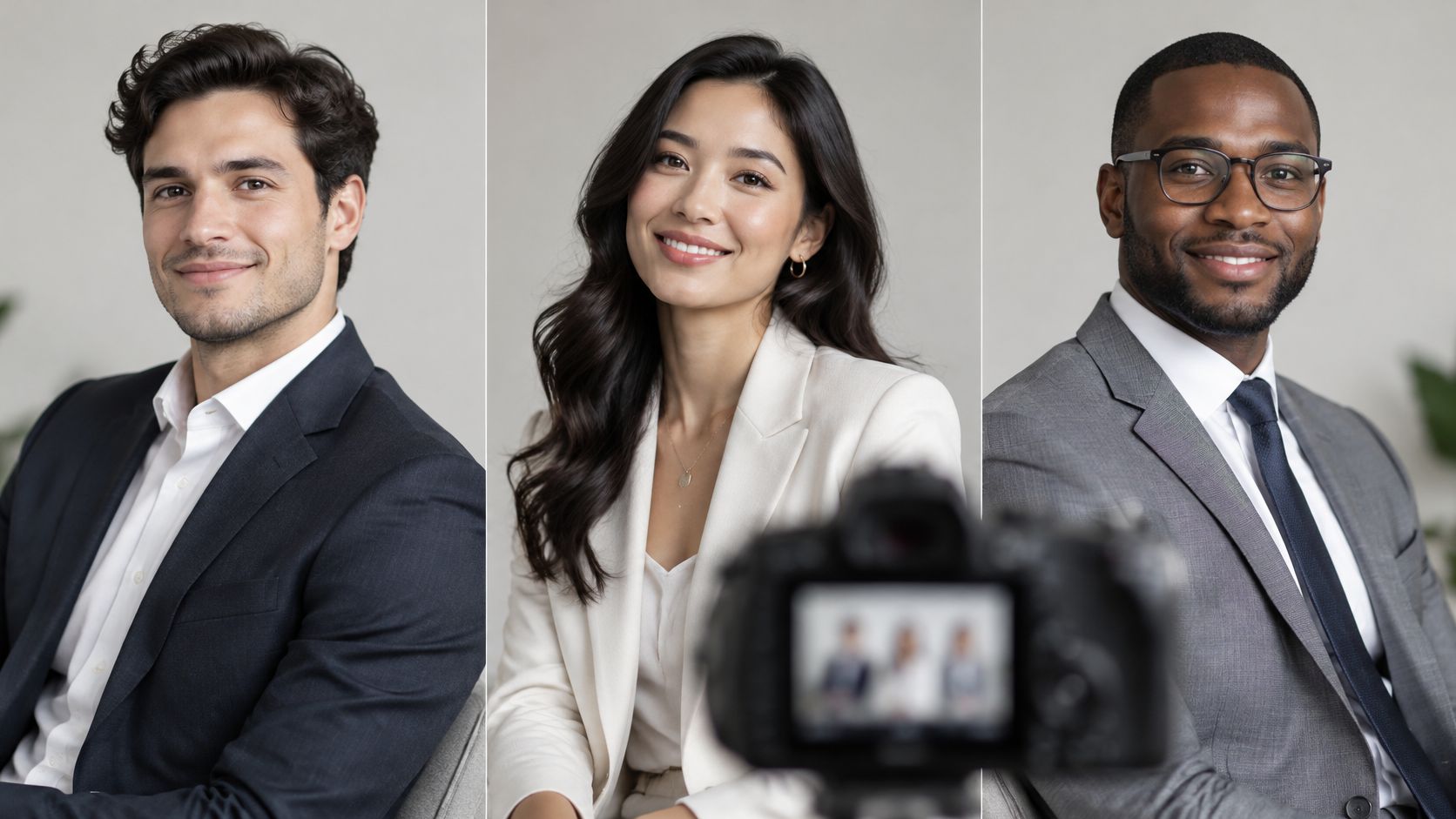
A subject walks in stiff, shoulders up near their ears, chin pulled back, and the first frames look guarded. Drop the near shoulder, turn the torso 30 degrees, bring the chin forward and slightly down, and move the key light to clean up the shadow under the eyes. The same person, in the same jacket, suddenly reads as credible.
That instant read is why pose direction matters. A summary of a Princeton-related finding notes that observers can form impressions of trustworthiness, competence, and likeability from a face in approximately one-tenth of a second, according to the Magic Studio LinkedIn profile picture guide. You don't get time to explain a tense jaw or a backward lean. The viewer has already decided.
These eight corporate headshot poses are broken down the way I'd evaluate them on set, by body angle, chin and eye-line direction, posture, expression, wardrobe interaction, light placement, and framing. Each one has a context where it earns its keep, from a conservative leadership page to a design-forward brand shoot. If you're gathering visual references before a session, there's useful headshot inspiration from RedactAI to compare against. Start here, then pick two poses to test on camera.
1. Classic Angled Squared-Shoulder Pose
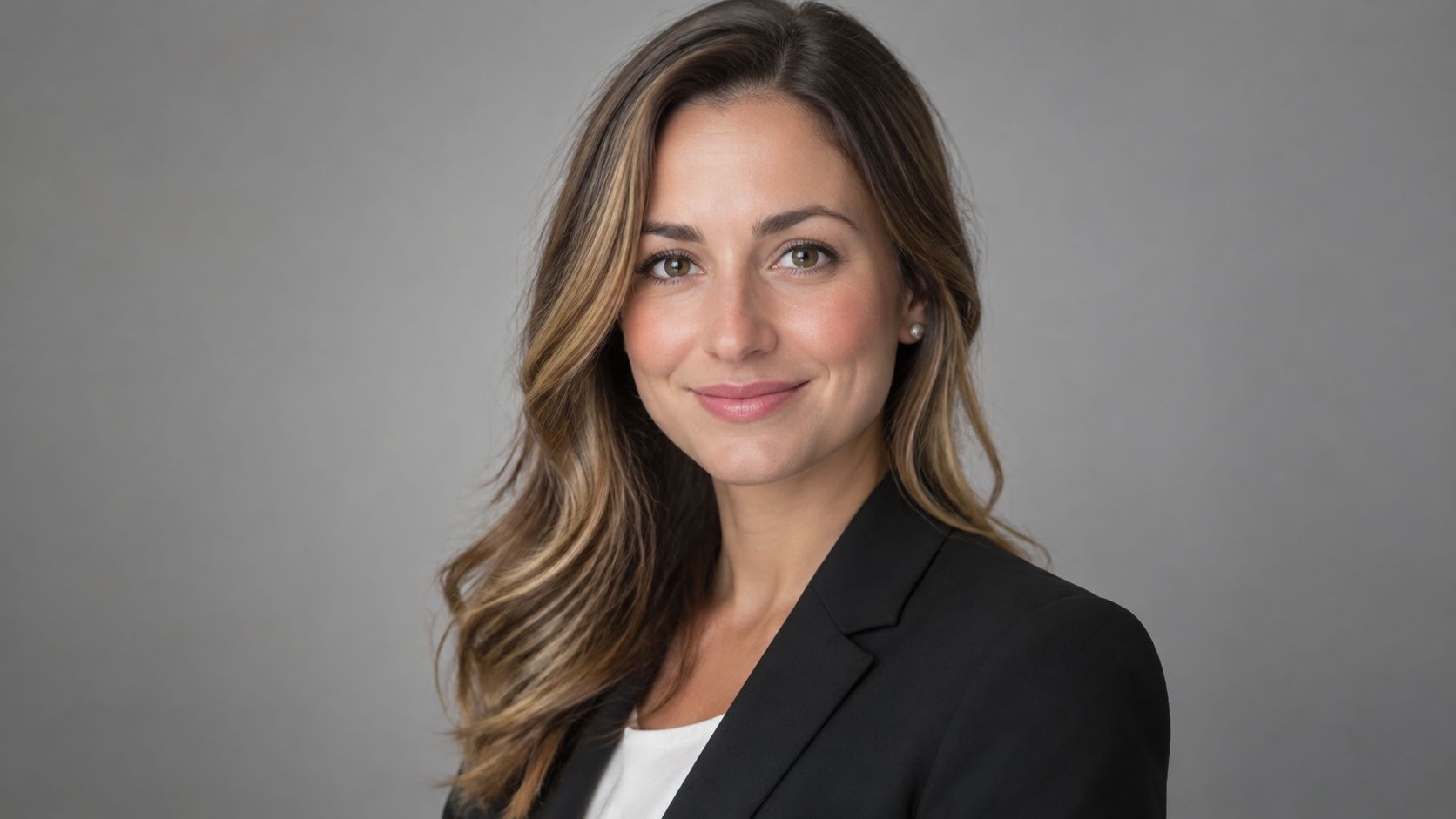
Turn the shoulders 30 to 45 degrees away from the lens, then bring the head back square to camera. That offset does two jobs at once. It gives the torso depth and a slimmer silhouette, and it keeps eye contact direct instead of drifting off frame with the body. Square-on shoulders look like an ID photo. This doesn't.
It's the default for executive and leadership pages for a reason. A 2018 analysis of 2,000 active LinkedIn profile photographs found 76% featured a full, toothy smile and 42% showed business-casual attire, according to the Snappr LinkedIn profile photo analysis. Expression is judged with clothing and framing, not alone. Say a regional architecture practice needs partner profiles on a neutral gray backdrop, or a hospital executive team needs the same angle repeated across twelve people. This pose standardizes cleanly.
How to Set It
- Start with the body turned: Bring the head back to the lens rather than rotating the face away with the shoulders.
- Drop the near shoulder: Lower the shoulder closest to camera slightly so the neck doesn't look hunched or shortened.
- Lean in a few degrees: A small forward lean from the waist engages the eyes and defines the jawline.
- Place the key at 45 degrees: That angle models the face instead of flattening it.
If you're refining this setup for a full team, these corporate portrait direction tips cover the repeatable basics. Keep the blazer buttoned or fully open, never caught halfway, and check that a collar isn't riding up on the turned side.
2. Three-Quarter Body Turn with Chin Down
Some subjects shouldn't lead with warmth. For a structural engineering principal on a credentials page or a university research director in a faculty directory, the job is focused expertise. Turn the body close to 45 degrees or more, drop the chin slightly, and let the gaze come up to the lens. Done right, it reads thoughtful. Pushed too far, it reads like a glare, so coach it in small increments.
The mechanics need care. Open posture paired with steady eye contact tends to read as credible, while an averted gaze and a closed-off body read as withdrawal. That is the tension built into this pose. The chin drops, but the chest stays open and the eyes stay locked on the lens. If the shoulders roll inward while the chin drops, credibility tips into defensiveness.
Coach the chin down in millimeters, not inches, and check preview frames after every small change. This pose shifts faster than any other on this list.
Light it differently than a square, bright setup. A hard source at this head angle throws deep shadow under the brow and buries the eyes, so reach for a softer, larger key light raised slightly above eye level, then add gentle fill from below. Watch the catchlights. Pair the expression with a subtle closed-mouth smile and a relaxed jaw. The mouth softens what the eyes intensify, and that balance is what technical, legal, medical and advisory clients usually need. Wardrobe stays structured: a soft, collapsing collar fights the precision of the pose, while a crisp lapel line reinforces it.
3. Arms-Crossed Confident Stance

Crossed arms get blamed for looking defensive, but the problem is usually tension, not the fold itself. Angle the body slightly, fold the arms low across the mid-chest, and let the hands rest loosely on the upper arms instead of gripping them. Shoulders down, elbows not clamped to the ribs. The stance then reads as grounded ownership rather than a barrier.
I reach for this pose when authority needs to be visible at a glance. Guidance on balancing authority with approachability notes that confident posture and a warm expression are repeatedly selected for high-responsibility roles, a point made in the Executive Lens analysis of headshot power. Say a general contracting owner is photographed on an active site, or a construction principal appears in a trade publication in workwear. A relaxed fold matches that world. A hand-in-pocket stance would look borrowed.
Where It Goes Wrong
A flat, unsmiling face overpowers this pose faster than any other. The arms already add visual weight, so the expression has to supply the warmth. Keep the chin level, not lifted, since a raised chin plus crossed arms reads as a challenge. A slightly lower camera angle, just below eye level, adds stature without turning theatrical.
Watch wardrobe closely. Crossed arms bunch jacket fronts, pull buttons, and bury shirt cuffs. Smooth the fabric after the fold is set, check that sleeves sit evenly, and make sure a watch or bracelet isn't catching a hard highlight from the key light.
4. Seated Desk or Chair Pose with Forward Lean

Seat the subject, turn the chair so the shoulders sit slightly angled to camera, and lean the torso forward with forearms resting on a desk, table, or knees. The lean is the whole point. Sitting back into a chair signals that the conversation is over. Leaning in signals the subject is mid-thought and paying attention.
That cue carries measurable weight. In a study of employers' perceptions of applicants, 87.5% noticed whether an applicant smiled and 62.5% noticed eye contact, according to the Concordia communication journal study, which also found a forward lean predicted perceived hireability. Say a commercial property manager sits at a conference table, or an interior design principal leans on a drafting table in the studio. The setting explains the work while the lean and eye contact do the interpersonal job.
- Keep hands partially visible: Relaxed, resting hands look natural. Hands hidden under the table look evasive.
- Use a longer lens: Compression keeps the face prominent and pushes a busy office into soft background.
- Clear the surface: Remove stray mugs, cables, and paper stacks before the first frame, not in retouching.
Set chair height so the shoulders don't shrug up to reach the desktop. Light from the side the subject faces, and keep the background at least a stop darker than the face so the environment supports rather than competes.
5. Hands-in-Pockets Relaxed Pose
This is the pose for brands that want to look capable without looking buttoned up. The subject stands with a slight weight shift to one leg, hands tucked into pockets or resting at the waist, jacket open. A design studio lead in a showroom or a hospitality operations director in a lobby gets modern ease from this stance. A bank leadership page probably shouldn't.
Relaxed doesn't mean collapsed. A scholarly review of nonverbal communication describes upright posture as a signal of engagement and readiness to work, while slouched posture may suggest low motivation or fatigue, according to the European Journal review hosted by the University of MaltaA38.pdf). So lengthen the spine first, then add the casual elements. Weight shift, yes. Shoulders rolled forward over the pockets, no.
Practical rule: Ask the subject to rock gently side to side and pause at a natural midpoint. A pose they settle into photographs better than one you freeze them in.
Wardrobe makes or breaks this one. Hands in pockets pull trouser fronts out of line and bunch jacket fabric at the hip, so smooth everything after the hands go in and check the vent and hem. Keep the jacket unbuttoned for an open silhouette, and consider thumbs hooked outside the pocket if full hands-in reads too casual. Light it warm and soft, a large source close in, because hard light fights the inviting tone this pose is built to deliver.
6. Leaning on an Architectural Element
Place the subject against a column, doorframe, railing, or wall and let the structure do real work. The lean creates a natural diagonal, the architecture anchors the frame, and the image ties the person to the spaces they design, build, or manage. Say an architect stands beside a signature staircase in a finished building, or a developer leans on a stone column in a new project. The setting becomes a credential.
Posture still carries the message, though. Research on workplace nonverbal communication identifies facial expression, eye contact, posture, and body movement as distinct elements shaping how communication is perceived, as set out in the University of Northern Iowa workplace communication study. A compressed, closed posture against a beautiful wall still reads as distance. Keep the upper body open, one shoulder blade or forearm making contact, chest turned partly out.
Setting the Frame
- Scout early: Confirm light direction, access, clean backgrounds, permissions, and site safety requirements before the session.
- Align with the structure: Match the body's vertical to columns and doorframes so the composition feels deliberate.
- Separate with depth: A shallow depth of field keeps detailed stone or steel from competing with the face.
For teams whose work lives in built spaces, headshots planned for design teams pull ahead of a plain backdrop. Watch mixed color temperatures near glass, and keep the subject a step off the surface if the wall texture is casting shadow patterns across the shoulders.
7. Tight Head-and-Shoulders Crop with Subtle Head Tilt

A circular crop on a directory page forgives nothing. When the final image will live at thumbnail size, stop composing for the full frame: crop tight on the head and upper shoulders, add a head tilt of 5 to 10 degrees, and let expression and eye contact carry everything. The chin stays neutral and the tilt does the work. This is the workhorse for a college admissions directory using identical crops or a lighting company's sales team across social profiles.
Size the subject for the smallest use first. Build one primary head-and-shoulders frame where the face fills most of the image, leave a small amount of headroom, and keep the eye contact direct. That scale survives a circular thumbnail crop, while a looser frame turns the face into a speck. These LinkedIn profile photo standards are worth checking before you lock a team-wide crop.
Keep the tilt small and consistent in direction and degree across the whole team, or the directory page looks assembled from different decades. Set the eye line at the upper third of the frame and hold one background color across every subject. At this magnification, light quality shows everything, so use a large, close key and check skin shine on the forehead and nose between frames. Wardrobe simplifies too. Neckline and collar are all that show, so they have to be clean.
8. Candid Mid-Conversation Gesture
Not every portrait should look posed. Give the subject someone to talk to, a real prompt to answer, and room for one hand to rise in an explanatory gesture. You're documenting communication style, not arranging limbs. Say a hospitality chief executive walks a property with staff, or a college dean explains a program on a campus tour. Leadership features, speaker profiles, and culture campaigns get more from this than from another static frame.
Authenticity here isn't just aesthetic. Reporting on synthetic imagery found 66% felt put off when they learned a headshot was AI-generated without disclosure, according to the PetaPixel report on AI-generated headshots. A real person mid-conversation, with an expression no render would invent, sidesteps that trust problem entirely. It also stays recognizable next to the same face on a video call.
The video below shows how gesture and eye-line direction behave when a subject is engaged rather than holding still.
Use continuous light or a fast shutter speed to freeze the gesture cleanly, and shoot in bursts. Most frames will catch a blink, a half word, or a hand crossing the face. You're hunting for the balanced one in between. Frame wide enough that gestures stay inside the crop, since a hand clipped at the wrist looks like an accident. Keep direction minimal once the conversation starts. The moment you start art-directing each movement, it stops being candid.
Corporate Headshot Poses at a Glance
| Pose | Body Angle | Best For | Tone Conveyed | Framing |
|---|---|---|---|---|
| Classic Angled Squared-Shoulder Pose | Shoulders turned 30–45°; head faces the camera | Executive and leadership portraits | Confident, approachable, professional | Tight crop or chest-up |
| Three-Quarter Body Turn with Chin Down | Body turned 45° or more; chin slightly lowered | Technical, legal, medical, and advisory professionals | Authoritative, thoughtful, focused | Three-quarter portrait |
| Arms-Crossed Confident Stance | Body angled 15–30° with upright posture | Founders, owners, and senior operators | Confident, experienced, grounded | Waist-up or upper-body portrait |
| Seated Desk or Chair Pose with Forward Lean | Seated, leaning slightly forward | Professionals photographed in their work environment | Natural, conversational, attentive | Seated environmental portrait |
| Hands-in-Pockets Relaxed Pose | Relaxed stance with a slight weight shift | Creative leaders, startups, and modern brands | Friendly, approachable, relaxed | Standing portrait |
| Leaning on an Architectural Element | Leaning against or beside a structural feature | Architects, designers, and property professionals | Relaxed, intentional, design-focused | Environmental portrait with architectural context |
| Tight Head-and-Shoulders Crop with Subtle Head Tilt | Upper shoulders framed; head tilted slightly | Digital profiles, directories, and social media | Approachable, professional, personable | Tight head-and-shoulders crop |
| Candid Mid-Conversation Gesture | Natural movement; body angle varies | Leadership features, speaker profiles, and culture campaigns | Authentic, engaged, communicative | Candid portrait with gestures in frame |
Choose the Pose, Then Make It Yours
Match the pose to the platform and the brand tone before you think about what looks good in isolation. A pose that sings at full size on a leadership page can disappear in a circular thumbnail, and a tight crop built for a directory has nothing to say in an editorial feature. Decide where the image works hardest, then work backward to body angle, expression, and framing.
For credibility-driven pages, start with the classic angled squared-shoulder pose or the three-quarter turn with chin down. Both hold eye contact, keep the posture deliberate, and repeat cleanly across a full leadership team. The arms-crossed stance belongs in that group too, provided the fold stays loose and the expression supplies warmth. These are the poses for executive biographies, credentials pages, proposal inserts, and press kits where consistency signals competence.
For culture-focused content, loosen the system. The seated forward lean, hands-in-pockets stance, architectural lean, and candid gesture all put the person in a place and a moment. They suit recruiting pages, studio profiles, speaker features, and brand campaigns where the goal is showing how people work together. The trade-off is control. Environmental poses need scouting, permissions, cleaner backgrounds, and more frames to land one that holds up.
Whatever you choose, shoot at least two variants per person, one tight and thumbnail-ready, one wider and contextual. That pairing covers the directory, the bio page, and the feature without reshooting. Shortlist two poses from this list, test them against your real usage contexts at final size, and judge them there, not on a full-screen preview. You'll spot weak eye contact, cramped crops, and background problems in seconds.
Consistency is where most team sets fall apart. One person squared to camera, the next in profile, a third lit from the opposite side, and the page reads as a collage instead of a company. A single session with fixed angles, one lighting plan, and the same eye line across every subject fixes that. Atlanta-based Jimmy Clemmons Photographer brings editorial discipline to that work, with portraits built on authentic expression and flattering lighting, a background shooting editorial content for publications including Condé Nast and Atlanta Magazine, and professional editing as a listed specialty. Refined lighting, precise composition, and consistent direction across a team are what turn eight individual poses into one coherent visual identity. Pick the pose deliberately, then execute it the same way for everyone who has to stand next to each other on the page.
If your leadership page or team directory needs portraits that hold together as one set, Jimmy Clemmons Photographer offers corporate portrait sessions with directed posing, refined lighting, and professional editing for architecture, design, and corporate brand teams. Tell us which two poses fit your brand and where the images will run, and we'll build the session around those uses. Start the conversation at Jimmy Clemmons Photographer.