

You're reviewing a website update when someone notices that the office looks different in the brochure. On the lobby screen, the same building feels colder, darker, and almost unfamiliar. Everyone used an approved photograph, yet nobody worked from the same rules.
Brand photography guidelines help your team resolve those differences before the next shoot. A useful document covers more than visual style. It tells photographers, designers, marketing staff, and publishing teams what to create, what they can change, and what they're allowed to publish.
Why Brand Photography Needs Written Rules
Consider a hypothetical office building photographed for different assignments. The website shows its entrance in cool morning light. The brochure uses a warmly edited evening view. The lobby screen crops away the entrance entirely, leaving a dramatic wall of glass.
Each photograph might work independently. Together, they tell different stories about the same place.
The problem isn't necessarily the photographer's judgment. Without written direction, each person makes reasonable decisions based on a different understanding of the assignment. A designer needs space for a headline. A property manager wants to show access. A communications team wants the building to feel welcoming.
Replace repeated decisions with shared standards
A mood board can suggest atmosphere, but it can't settle every production question. It might show warm interiors without explaining whether a pale stone wall should remain neutral. It might feature relaxed portraits without saying how tightly a designer may crop them.
A working standard explains both the intention and the boundary.
Practical rule: If your team keeps discussing the same photography decision, write down the decision and show an approved example.
Written guidance is especially useful when several people commission or publish images:
- Architecture and design teams need a shared approach to perspective, materials, and spatial relationships.
- Developers and property managers need photographs that communicate spaces without misrepresenting them.
- Corporate marketing teams need portraits and workplace imagery that belong together.
- Hospitality groups, schools, and contractors need continuity across locations, projects, and changing contributors.
The document shouldn't make every image identical. A construction detail and a leadership portrait have different jobs. Your rules should explain what connects them, such as restrained color, deliberate framing, or believable human presence.
Start with the decisions people must make. Then give them enough direction to work confidently without asking the marketing lead to approve every adjustment.
What a Brand Photography Guideline Covers
Think of your guideline as a building blueprint. The drawings communicate an intended result, but they also explain how different parts fit together. A beautiful elevation alone won't tell a contractor how to build the structure.
Photography needs that same connection between appearance and execution. Creative direction, technical requirements, delivery specifications, and governance should support the same intended identity.
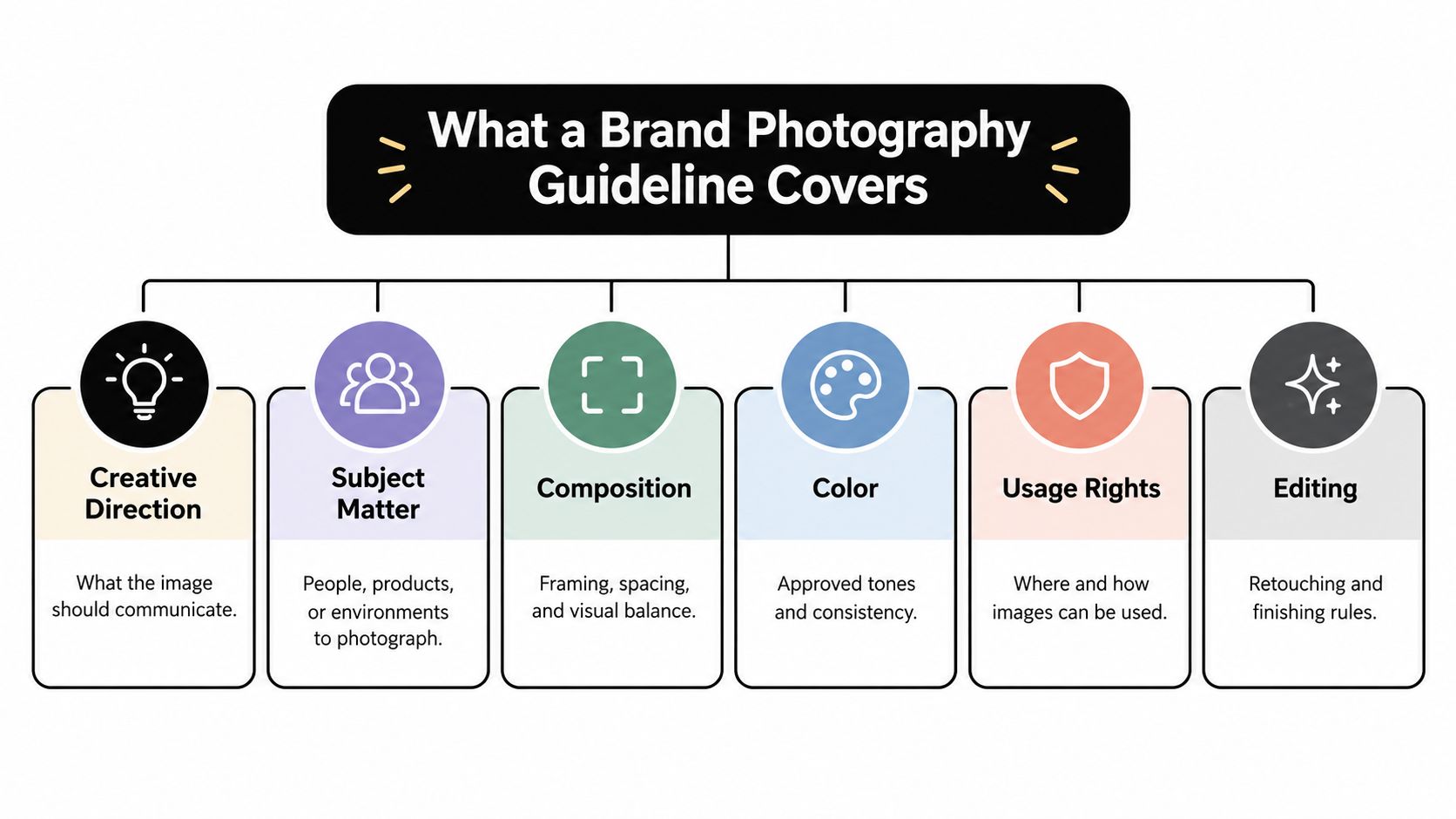
The diagram groups the main visual and governance decisions.
Build the document around practical questions
Begin with what the image should communicate. An interiors practice might want viewers to notice material relationships and comfortable proportions. A corporate team might want people to appear approachable without looking casually unprepared.
Then connect that intention to decisions people can apply.
| Component | Question the guideline should answer |
|---|---|
| Creative direction | What should viewers understand or feel? |
| Subject matter | Which people, environments, and details belong in the library? |
| Composition | How should framing, perspective, and space support the message? |
| Technical controls | What must reviewers check before accepting a file? |
| Delivery | What does each publishing team need? |
| Governance | Who approves images, edits, and permitted uses? |
For broader context, these brand consistency examples and practical steps can help teams connect photography decisions with the rest of their visual identity. Use that discussion to identify shared principles, not to replace photography-specific instructions.
Keep permanent rules separate from shoot details
A guideline describes decisions that should remain stable across assignments. A shoot brief describes the current job.
For example, the guideline might require environmental portraits with uncluttered backgrounds. The brief names the employees, identifies available rooms, and explains where those portraits will appear. The guideline establishes the approach; the brief makes it executable at a particular location.
Don't put temporary scheduling details into the permanent standard. Equally, don't hide a lasting rule inside an old email about a previous shoot.
Give the document an owner and a clear approval process. When a photographer encounters an exception, such as an unusually narrow interior, they should know who can authorize a different approach and where that decision will be recorded.
Separating Creative Direction from Technical Quality
A photograph can feel right and still fail technically. It can also be technically clean while communicating the wrong thing. Reviewers need separate language for those judgments.
Use a shared review setting to make those distinctions explicit.

Write creative rules as observable choices
“Premium” isn't enough direction. Neither is “authentic.” Those words leave the photographer guessing what the team wants.
For an architectural exterior, explain whether the building should appear monumental or connected to everyday activity. For an interior, specify whether viewers should notice circulation, furnishings, or the relationship between rooms. For a leadership portrait, describe the intended expression, posture, and relationship to the workplace.
Replace broad adjectives with examples:
- Instead of “clean,” ask for uncluttered edges and deliberate background selection.
- Instead of “warm,” describe inviting light while preserving believable material colors.
- Instead of “natural,” ask for credible working gestures rather than staged handshakes.
- Instead of “bold,” specify strong spatial relationships or a clearly defined focal point.
Explain why each choice matters. Negative space may support a campaign headline, while a contextual view may help prospective tenants understand an entrance.
Make technical acceptance a separate review
Image-quality assessment has developed beyond subjective visual matching. ISO 19264-1, published in 2017, established a framework for evaluating technical image quality in high-accuracy reproduction workflows, reflecting the move toward measurement-based validation described in this history of photographic quality standards.
A brand team doesn't need to adopt a specialist reproduction workflow wholesale. It can borrow the useful distinction between creative judgment and technical verification.
Check whether important details are sharp at the intended output size. Review exposure, distracting noise, and consistency across a series. Define repeatable capture conditions where continuity matters, particularly for portraits photographed on different dates.
Approve the creative intention and the technical execution separately. “I prefer it darker” isn't the same finding as “the finish detail is no longer visible.”
This separation also supports managing client visual expectations. Agree on reference images and acceptance criteria before the photographer arrives, then identify which reviewer has authority over each kind of decision.
Use the video below as a prompt for discussing how your team evaluates visual choices.
During review, record the reason for a requested change. “Recover the window detail so the frame remains visible” gives an editor a clear task. “Make it better” doesn't.
Color Management for Web and Print
A pale wall shouldn't become yellow just because someone exported a brochure image differently. Nor should a corporate jacket change character between the approved portrait and its printed version.
Color management gives the people handling an image a shared way to interpret its colors. It doesn't mean every screen and printed surface will look identical. It means your team controls the workflow instead of relying on accidental agreement.
Establish a controlled path
Formal color-management frameworks developed during the transition from analog to digital imaging. ISO 15076-1 was approved in April 2005, providing a recognized structure for profile-based color management, as documented in the history of graphic technology standards.
For a marketing team, the practical lesson is straightforward: write down how color moves through the production process.
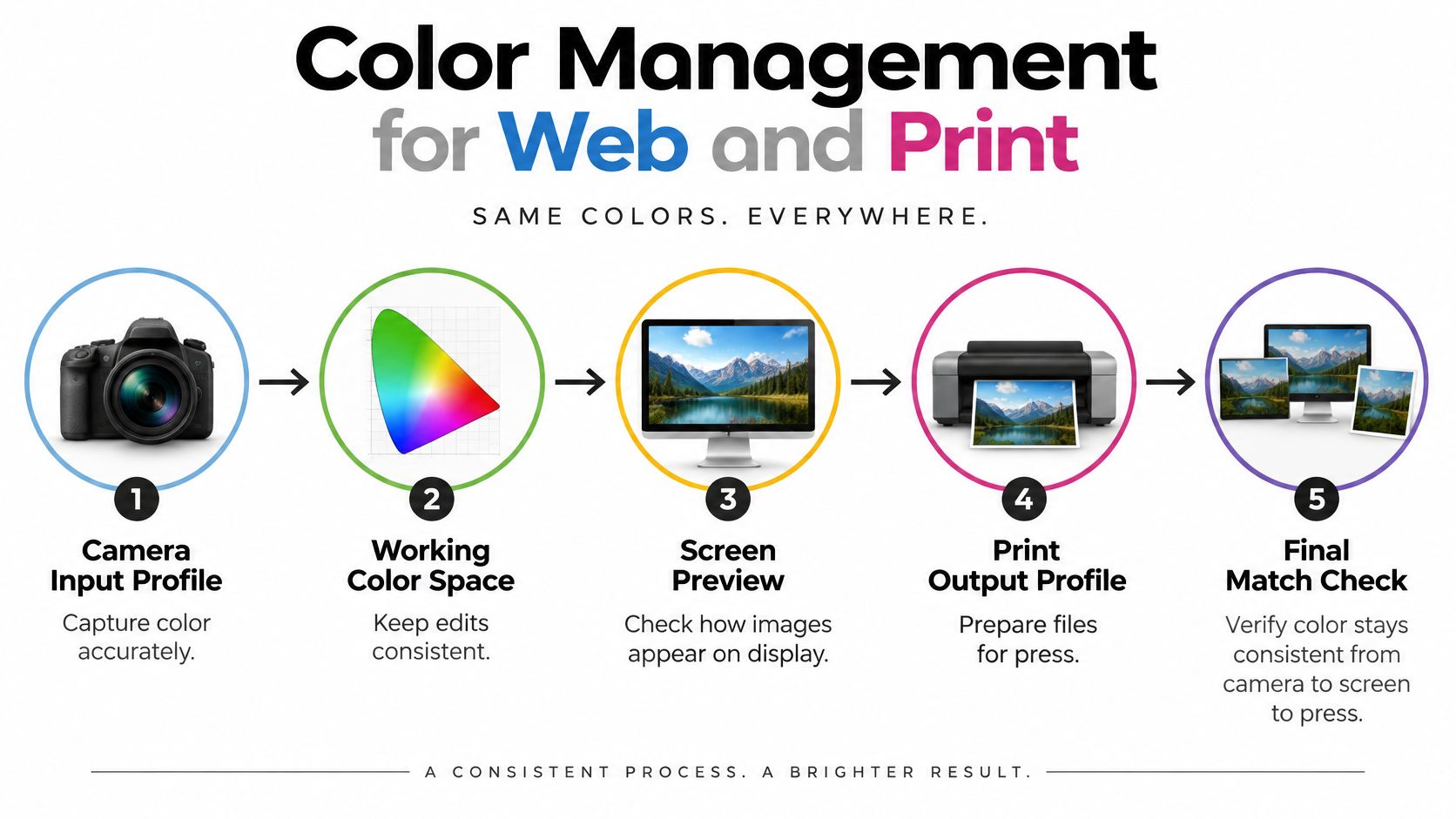
Each checkpoint protects a different part of that process:
- Capture interpretation: Specify the camera input profile and reference approach used to interpret captured color.
- Working environment: Keep edits in a documented working color space and retain a non-destructive master.
- Display review: Require calibrated display review before approving sensitive material or wardrobe colors.
- Output preparation: Produce separate digital and print deliverables rather than treating an export as universal.
- Final approval: Review the intended output, not just the editing file.
Separate the master from its destination
The International Color Consortium's color-management guidance recommends input, monitor, and printer profiles and identifies sRGB as the color space used by nearly all web-oriented standards. Your guideline should therefore require an embedded sRGB profile for the digital JPEG deliverable.
For supported print workflows, retain a wider-gamut working master. Ask the printer or publication to identify its required output profile, then use its approved conversion for CMYK or publication delivery. Don't assume that converting everything to a generic print setting will preserve the intended appearance.
Consider a hypothetical hotel interior with warm wood, pale stone, and painted cabinetry. The creative team may want a welcoming atmosphere, but the editor still needs a trustworthy reference for those finishes. Define where expressive treatment is acceptable and where material fidelity takes priority.
Keep color grading decisions distinct from output preparation. The first establishes the intended treatment. The second prepares that approved treatment for a destination.
If your handoff also includes scanned proofs or reference documents, keep document preparation separate from photographic color approval. Guidance to optimize scanned PDFs for smaller uploads can support that administrative handoff without replacing a proper color proof.
Usage Rights, Ownership, and AI-Assisted Edits
Authentic photography doesn't have to mean untouched photography. Removing sensor dust doesn't invent a room. Balancing exposure doesn't turn an employee into someone else. The useful question is whether an edit preserves the truth of what the viewer is being shown.
Ownership needs the same precision. Possessing a delivered file doesn't, by itself, answer every question about permitted use.
Write permissions beside the asset
In the United States, original photographs receive copyright protection when fixed in a tangible medium, generally when the picture is taken. Initial protection doesn't require registration, although the U.S. Copyright Office's guidance for photographers recommends registration and explains its additional legal benefits.
Your guideline should require a written usage-rights schedule, with the actual agreement reviewed by an appropriate legal adviser when needed.
| Rights field | What the team should record |
|---|---|
| Ownership | Who owns the copyright |
| Licensed media | Approved website, advertising, print, signage, and other uses |
| Territory | Where the license applies |
| Duration | How long the permitted use continues |
| Editing | Which adaptations are authorized |
| Third-party use | Whether partners may receive or republish the image |
This is especially important when a contractor, designer, property owner, and publication all want the same photograph. Don't assume one party's permission automatically extends to the others.
Treat licensing a photo for commercial use as a production decision, not a question to resolve after an advertisement has been designed.
Judge edits by their effect on meaning
Set boundaries before editors begin. The following is a recommended policy framework, not a claim that every assignment should use identical restrictions.
- Generally permitted with review: Dust removal, exposure balancing, and noise reduction that preserve the represented subject.
- Conditional approval: Object removal, image extension, or background adjustments that require a named reviewer to assess factual implications.
- Prohibited representation: Invented building features, materially altered spaces, or synthetic people presented as actual employees.
A temporary cable in a conference room and a permanent support column aren't equivalent distractions. Removing the column changes what a prospective occupant believes about the space.
Approval boundary: If an edit could change someone's understanding of the property, person, or service, stop and obtain explicit approval.
For AI-assisted work, record the original asset, the operation performed, the responsible editor, and the approving reviewer. Keep before-and-after versions when changes affect scene content.
Specify when disclosure is required and who decides. The person pressing the editing button shouldn't also have to invent the organization's policy on factual accuracy, likeness permissions, or architectural representation.
Writing Specs for Files, Formats, and Alt Text
“Send high-resolution images” isn't a delivery specification. It leaves the web manager guessing which file belongs on a mobile page and the designer guessing which version can support print production.
Preserve your master files, then commission channel-specific derivatives. Each publishing team should receive files prepared for its actual use.
Turn delivery into named fields
Use a delivery sheet that an editor can complete and a recipient can verify.
| Field | What to specify |
|---|---|
| Destination | Website hero, portrait directory, property listing, or print placement |
| Dimensions | Required pixel dimensions and permitted aspect ratios |
| Transfer limit | A file-size ceiling established for that destination |
| Format | Preferred format and required fallback |
| Crop | Focal point and protected architectural or portrait details |
| Filename | A consistent project, subject, and version convention |
| Accessibility | Proposed alternative text and any longer description |
| Approval | Responsible reviewer and approved version |
For web publishing, evaluate WebP or AVIF where supported and retain JPEG or PNG fallbacks where required. The HTTP Archive's performance analysis reports that modern formats generally offer better compression than legacy formats and explains why images need intrinsic dimensions.
Require responsive delivery through srcset and sizes, along with explicit width and height attributes or a defined aspect ratio. Oversized files increase transfers; missing dimensions can cause layout movement while the browser determines image geometry. Published benchmarks include Largest Contentful Paint under 2.5 seconds and Cumulative Layout Shift under 0.1, summarized in these website performance and accessibility benchmarks.
For printed collateral, include production requirements alongside photography requirements. Instructions to set up business card bleed illustrate the kind of placement-specific preparation a print handoff may need.
Describe the image's job
Alternative text depends on context. An informative image needs an equivalent description. A decorative image needs an empty alternative attribute. A linked image needs wording that explains its action or destination, as outlined in this image accessibility checklist.
For an office entrance, proposed alt text might be: “Glazed entrance beside a covered walkway leading to reception.” If that image acts as a navigation control, describe the destination instead.
Complex architectural diagrams may need a nearby longer explanation. Don't squeeze every spatial detail into a short alternative.
Finally, require relevant filenames, useful surrounding text, and crawlable image locations. These practices align with image search guidance, which also emphasizes meaningful alt text and relevant structured-data images. Keep essential instructions and claims in page text rather than locking them inside a photograph.
Applying the Guidelines With a Checklist and a Next Step
A guideline becomes useful when someone checks it during production. Don't wait until final delivery to discover that the compositions won't support the intended layouts or that a partner lacks publication rights.
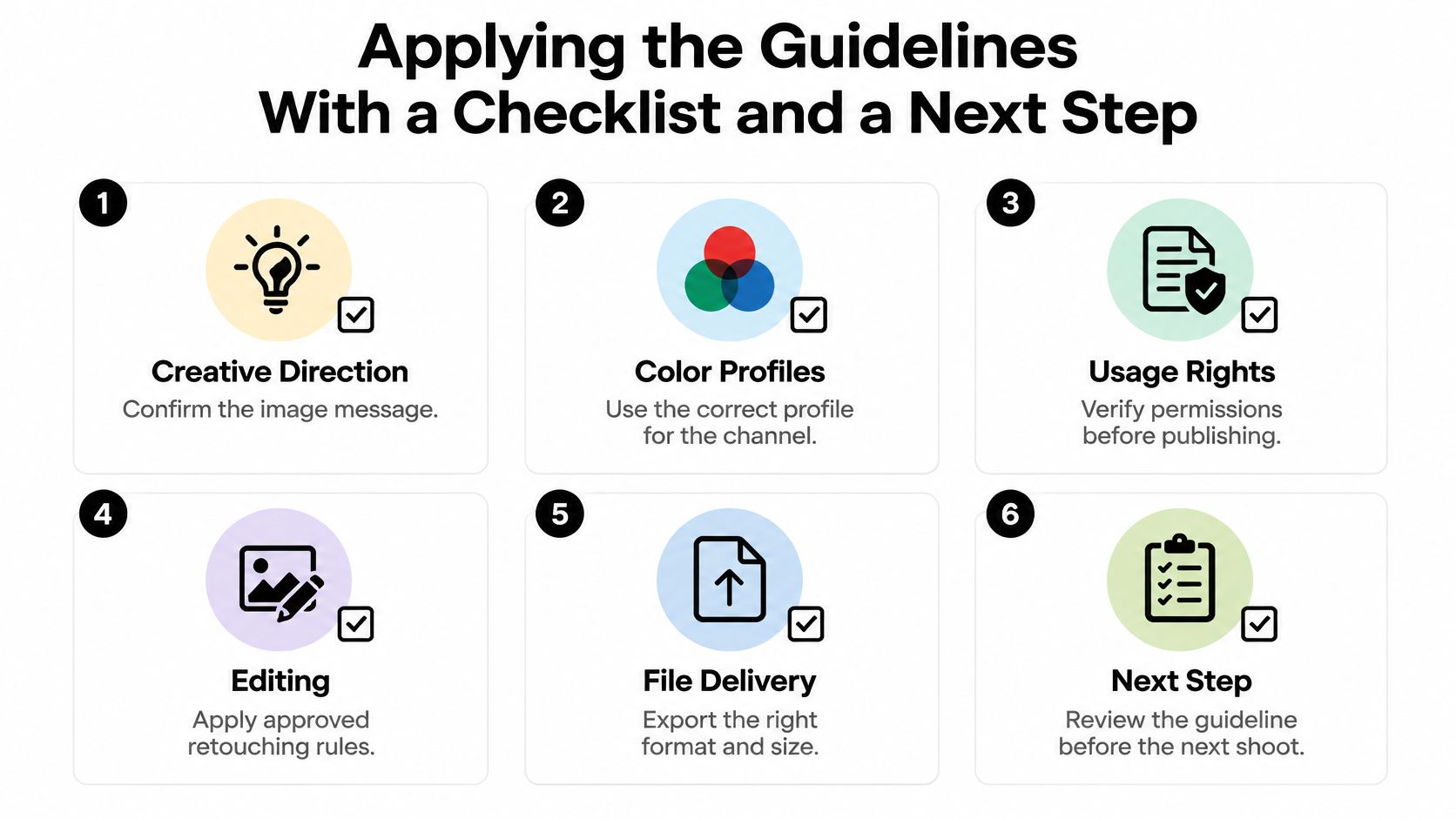
Use a compact checklist at assignment approval, during the shoot review, and before publishing.
Give every check an owner
- Creative direction, marketing lead: Confirm the image message, reference choices, and intended placements.
- Color profiles, photographer or editor: Verify the approved workflow and channel-specific output.
- Usage rights, commissioning manager: Confirm that planned publication falls within the agreement.
- Edit limits, designated approver: Review substantive changes and retain required provenance records.
- File delivery, production lead: Check formats, crops, dimensions, naming, and destination requirements.
- Alt text, publishing editor: Adapt descriptions to each image's function on the page.
On a hypothetical office-interior assignment, the marketing lead starts by identifying what prospective clients should understand about the space. During location scouting, the photographer evaluates viewpoints, access, and lighting conditions.
The team then agrees on lighting design and on-set direction before capture. During editing, the designated approver reviews any substantive changes. The publishing editor accepts the deliverables against the delivery sheet rather than choosing whichever file looks largest.
Choose a partner by how they work
An internal team may suit recurring assignments when staff have the necessary skills and capacity. A generalist vendor may suit a varied brief, provided the team demonstrates how it will meet your architectural and portrait requirements.
A specialist studio is another option when the assignment combines built environments, lighting control, and corporate imagery. Ask each candidate to explain its scouting process, review stages, delivery documentation, and handling of exceptions.
Compare those answers against your guideline. A portfolio helps you assess visual judgment, but a production conversation helps you assess whether the working relationship will support your standards.
Before the next commission, review the checklist with everyone who creates, approves, or publishes photography. Resolve unclear ownership now, while changing a sentence is easier than repeating a shoot.
For regional assignments, Atlanta-based Jimmy Clemmons Photographer offers architectural imagery, commercial brand content, and professional portraits, with location scouting, lighting design, on-set direction, and professional editing. Review your checklist with your team, then visit the studio's website to discuss your project, intended uses, and delivery requirements.